3D website examples, and what makes them work.
The best 3D website examples use 3D to show something a photo cannot: a signal dropping, a product coming apart, a service nobody sees. Below are three live 3D sites I designed and built, the job the 3D does on each, and the rules that keep them fast on a phone and readable by Google. Built for CEOs, founders and marketing leads at B2B tech companies.
2 of 3 spots left in November
250+ brands in 8 yearsGoogle 4.7 (29)Upwork 4.9 (126 reviews)Proposal in 2-8 h
How to judge a 3D website example.
A 3D site can look great in a showreel and still lose buyers. Ask these questions of every example, mine included.
- What does the 3D show that a photo could not?
- Can you read the text before the scene loads?
- Does it work on a mid-range phone?
- Is there a still version when motion is off?
- Is the next action always visible?
- Can Google and ChatGPT read what the page says?
Three 3D websites, three different jobs for the 3D.
All three are designed and built by me, and all three are live. Each card says what the 3D does that a photo could not.
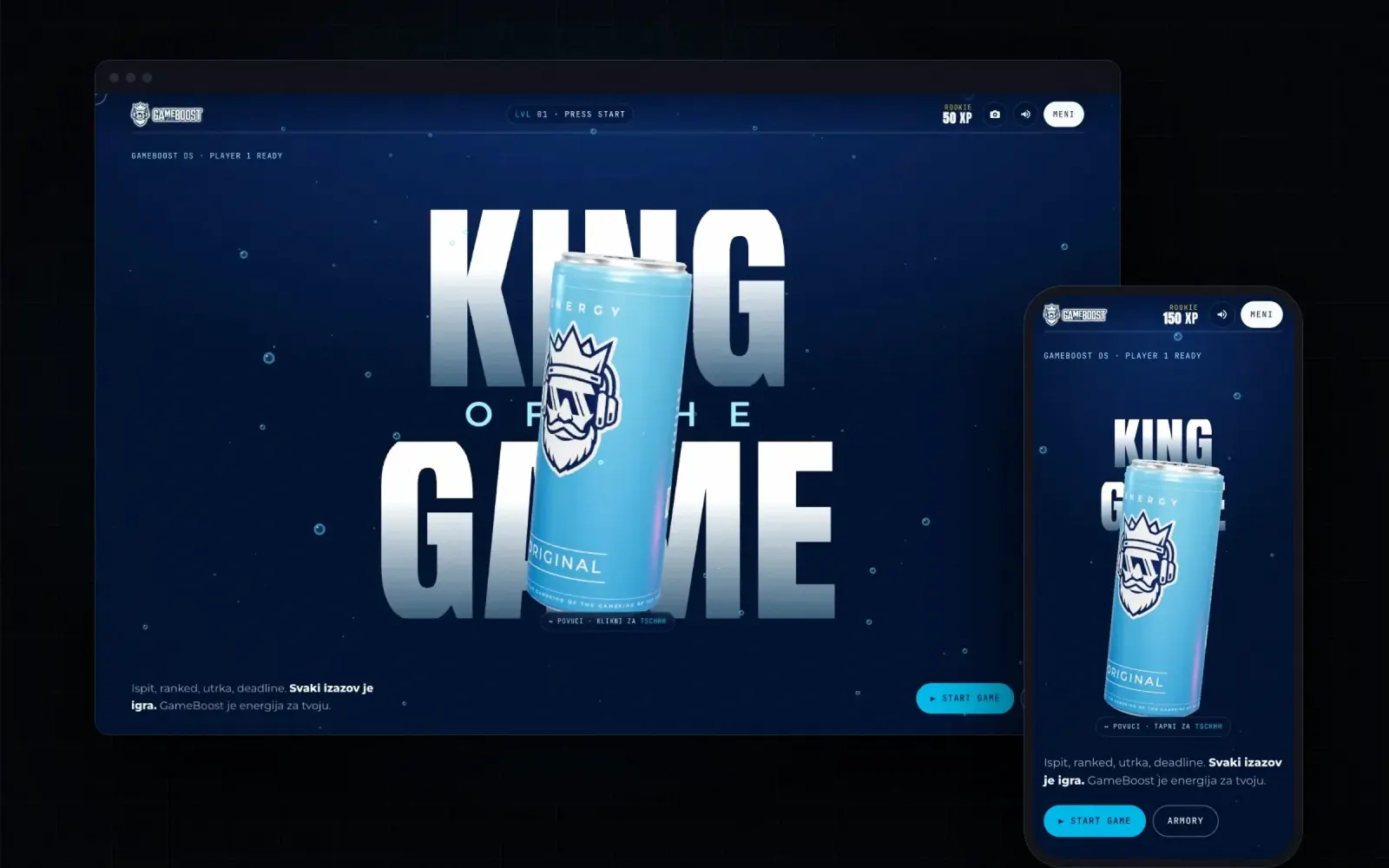
GameBoost Energy
The site is a game: story mode with XP and a final boss, a 3D armory where every can breaks into a wireframe schematic of its ingredients, and a co-op mode where retail buyers build a pallet and send an enquiry.
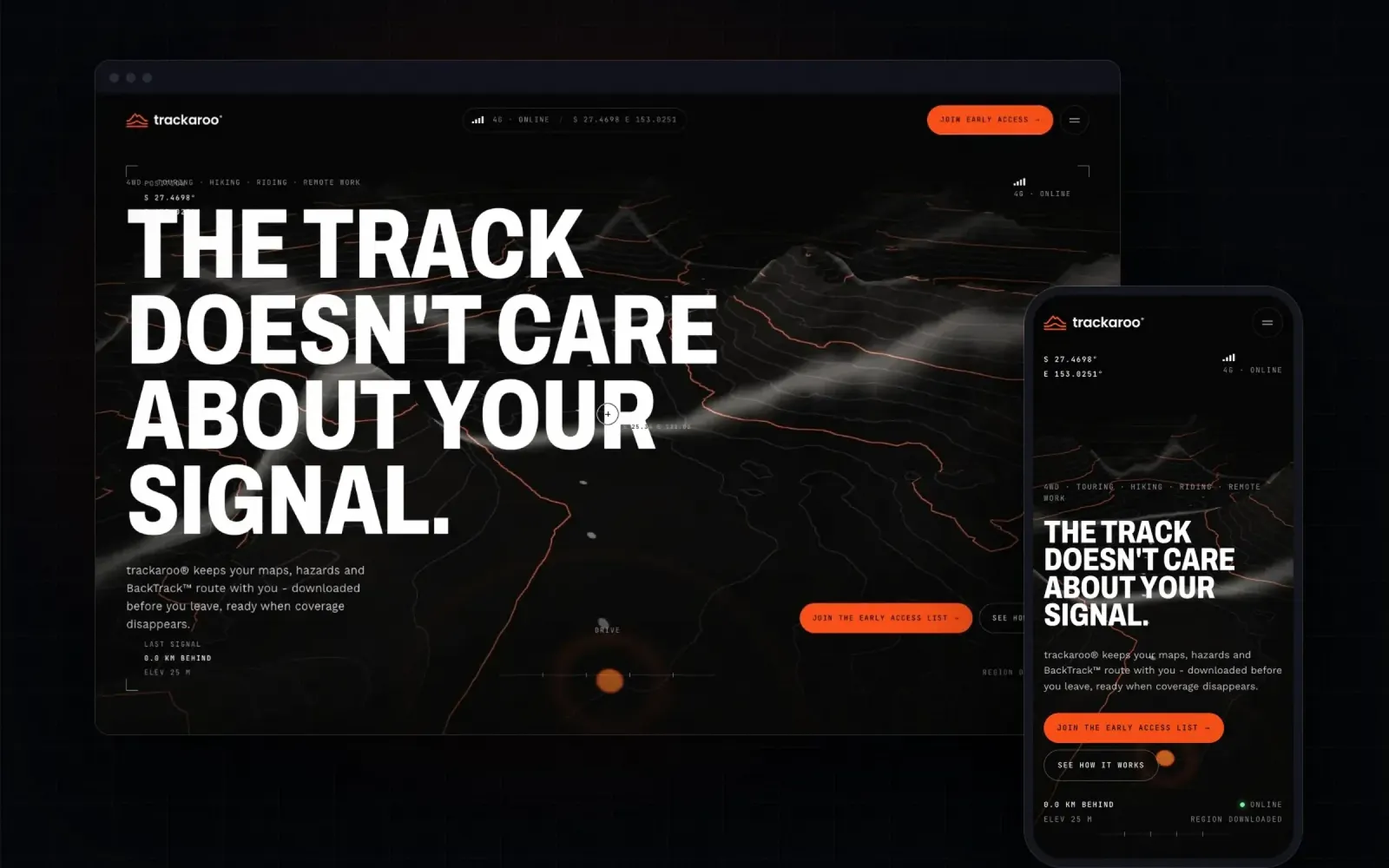
Offline navigation appTrackaroo
The page loses signal as you scroll. A 3D topographic terrain of the outback, a signal readout that drops from 4G to no service, and BackTrack drawing the way home exactly when the story needs it.
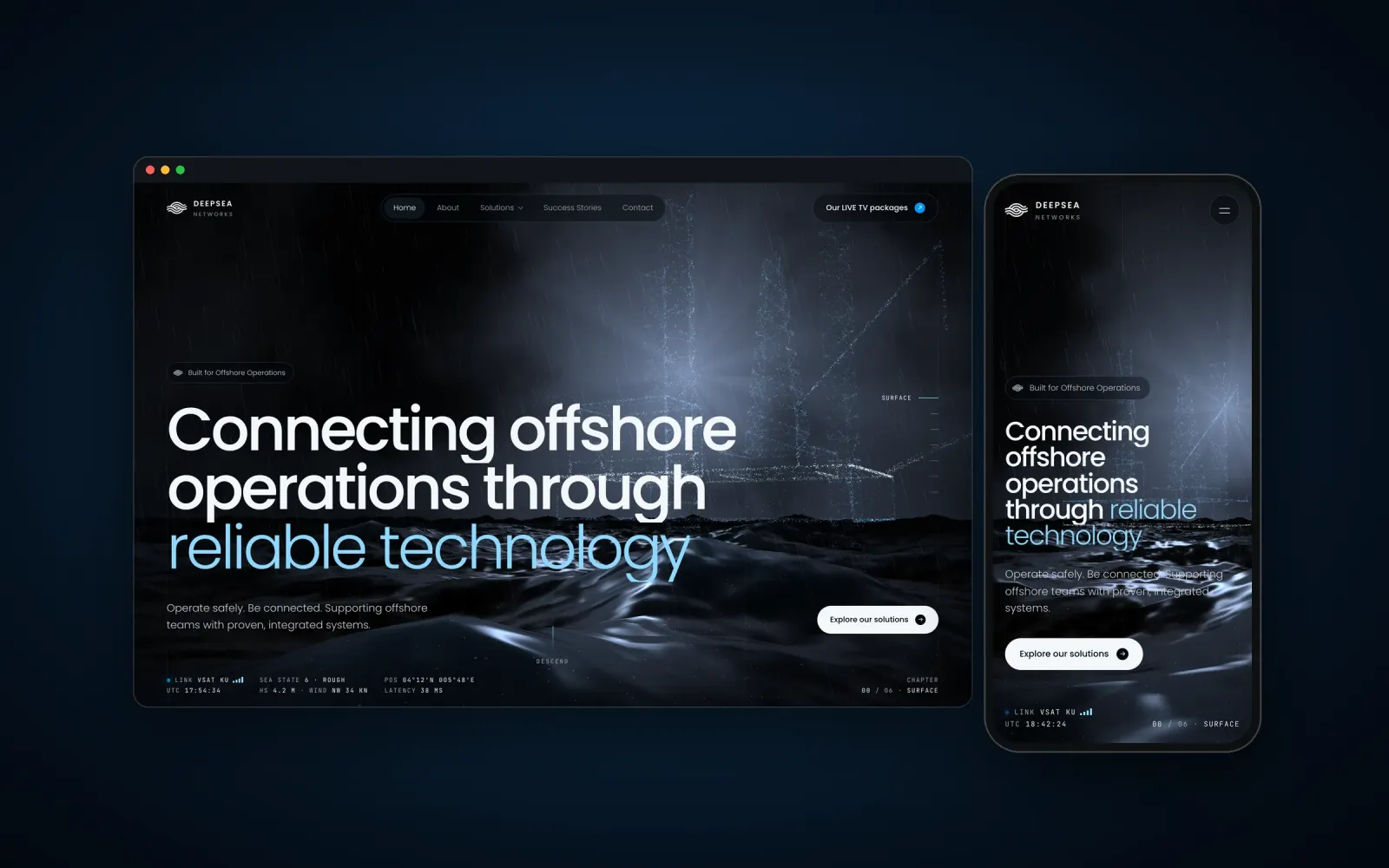
Offshore telecomDeepsea Networks
A service nobody sees, made visible. The homepage is a six-chapter descent from the surface to the depth, with a telemetry HUD showing link status, sea state and latency.
The job behind each scene.
| GameBoost | Trackaroo | Deepsea Networks | |
|---|---|---|---|
| The problem | Category sites that all look the same | A feature people ignore until it is too late | A mission-critical service nobody can see |
| What the 3D shows | Every can, down to the ingredients | The moment the bars drop | Offshore reality and live telemetry |
| Interaction | Play, rotate, break apart | Scroll, and the signal fades | Scroll down a six-chapter descent |
| Business job | B2B enquiries in the same build | Early-access sign-ups | Trust with operators |
| Tech | WebGL, Web Audio, HTML-first | WebGL terrain, HTML-first | WebGL, Three.js, HTML-first |
How a 3D site stays fast and readable.
The rules I build every 3D site with. Heavy 3D usually costs speed and search; these keep it from doing that. Try the live sites: GameBoost, Trackaroo, Deepsea.
- Real HTML under every WebGL scene, so Google, screen readers and AI assistants read the text
- The page is usable first, the 3D loads after it
- A still fallback for slow devices and for people who turn motion off
- Sound off by default, on only by choice
- Models and textures cut to what the scene needs on a phone
- One clear action per section, so the 3D never hides the next step
When a 3D website is the wrong call.
If the 3D only decorates, skip it. A spinning logo or a floating blob adds weight and says nothing. Every example above uses 3D to show something words and photos cannot: an ingredient list you can take apart, a signal you watch drop, a sea state you would never see from an office.
If your buyers mostly read on old laptops in procurement, keep the 3D to one hero scene and let the rest be fast, plain pages. For SaaS products a clear homepage often beats a cinematic one: see SaaS website examples. The service behind these sites is 3D websites, and the longer argument is in 3D websites for B2B.
Open the full cases.
Each case shows the decisions behind the scene, what I rejected and what the site had to sell.
From idea to a scene that runs on a phone.
You see a moving draft early, not at the end.
Find the job
One thing the 3D must show that nothing else can. If there is none, no 3D.
Story first
The scroll or play path, written as chapters before any modelling.
Build light
HTML first, then the scene, cut to what a phone can carry.
Test on real devices
A mid-range phone, a slow network, motion off, a screen reader.
Tell me about your brand. Get a plan in a minute.
Three taps, then my plan for you: the package, the days and what you get. If it fits, I write a fixed-price proposal in 2-8 hours. One field at the end, email or WhatsApp. Nothing is binding.
Before you decide: AI Mirror shows what ChatGPT says about your company today, and Position Check compares your site with competitors. Both free.

Decorative 3D, next to 3D with a job.
| Decorative 3D | 3D with a job | |
|---|---|---|
| What it shows | A floating shape | The product or the problem |
| Speed | Waits for the scene | Text first, scene after |
| Search and AI | Often a blank canvas | Real HTML, fully readable |
| Memory | Pretty, then forgotten | The site people tell others about |
Not right? Full refund.
You see the strategy and the first design direction before anything else gets built. If it doesn’t feel like your company, tell me within 24-48 hours and you get back everything you paid.
- Full refund if the first direction isn’t right
- Every file and key is yours from day one
- Fixed price, nothing added unless you ask
Written into every proposal.
Straight answers.
Do 3D websites hurt SEO?
Only when the text lives inside the canvas. I put real HTML under every WebGL scene, so Google and AI assistants read the page like any other. More in SEO and AI search.
Do 3D websites work on phones?
They should. Every scene is cut to what a mid-range phone can carry, and there is a still fallback for slow devices and reduced motion.
What are 3D websites built with?
The scenes in WebGL, mostly Three.js. The rest of the site in Framer or custom code. See Framer websites.
How long does a 3D website take?
A site is 7-14 days, or 21 days with the brand. A very large build can take up to 30, set in the proposal. Details on 3D websites.
Is 3D right for a B2B company?
When it shows what words cannot. Deepsea is offshore telecom, about as B2B as it gets, and the 3D is how it shows a service nobody sees.
Want a 3D site with a real job? Tell me in a minute.
Proposal in 2-8 hours. Or 15 minutes on a call, and if it's not a fit, I'll tell you.