
 Hrvatski
Step 1
Write the brief
Goal, audience, message, action. One page.
Start with one idea and one brief. Then list the channels, the sizes and who makes what. That is the whole plan.
Free: your brand in 3 real designs, in 48 hours.
To plan campaign visuals across channels, write one short brief, pick three to five channels, list the visual each one needs, and make them all from the same colours, fonts and layout rules.
Do the brief before all else. Then make one hero visual, and turn it into the other sizes. This keeps the campaign looking like one idea everywhere.
 By Vedran Obradović · Updated 7 November 2026
Teams that ask for visuals one at a time get ten different looks. One brief gives you one look.
Write down four things: the goal, the person you want to reach, the one message, and the action you want. Keep each to one line.
If the message needs more than one sentence, it is not ready. Cut it. A campaign that says one thing is easier to design and easier to remember.
Need a template? Use the campaign creative brief template.
Do not go everywhere. Pick three to five channels where your buyers already are.
| Channel | Visual you need | Keep in mind |
|---|---|---|
| LinkedIn post | Square or tall image, or a short video | One headline, big and short |
| LinkedIn banner | Wide banner for the page and for each person | Leave room for the profile photo. See LinkedIn banner sizes |
| Header image and a signature banner | Add text too, because some apps block images | |
| Website | Hero image and a campaign page | The same words as the posts |
| Sales deck | One slide that tells the campaign story | Use the same colours and fonts as the posts |
| Event or webinar | Title slide, stage screen, name badge | Same headline everywhere |
Sizes change over time. Check the current size on each platform's help page before you export.
Free tool
A campaign repeats your brand many times. Answer a few short questions. You get your brand score and the top thing to fix. It is free.
Use this for every campaign. It takes an afternoon.
Step 1
Goal, audience, message, action. One page.
Step 2
One strong image with the headline. This is the master.
Step 3
Three to five. Write the visual each one needs.
Step 4
Same headline, same colours, new size. See how to turn one idea into ten posts.
Step 5
Logo, colours, fonts, voice. Use the campaign asset checklist.
Step 6
Put dates in one calendar. After two weeks, keep what worked.
Leave your email. I design them by hand and send them to you within 48 hours. It costs you nothing.
I write to you from [email protected]. If you do not see it, check spam.
Paste it into a doc or a spreadsheet. One row per channel.
CAMPAIGN: [name]
Goal: [one line]
Audience: [who]
Message: [one sentence]
Action: [what they do]
Dates: [start] to [end]
Owner: [name]

HERO VISUAL
Headline: [max 8 words]
Image: [photo or graphic, link]
Brand check done: [yes / no]

CHANNELS
Channel | Visual | Size | Owner | Due date | Status
LinkedIn post | | | | |
LinkedIn banner | | | | |
Email header | | | | |
Signature banner | | | | |
Website hero | | | | |
Sales slide | | | | |

LAUNCH DAY
- Post at: [time]
- Everyone changes banner and signature at: [time]
END DAY
- Remove banners and signatures at: [date]
A common question from founders: how do we get professional visuals when we do not have a designer? And even with templates, non-designers drift off brand.
The fix is not more rules in a PDF. It is tools where the brand is locked in. People change the words and the photo, and the rest cannot break.
With Brand OS Portal, your team makes posts, motion posts, banners, signatures and slides from designs I made for your brand. The Campaign Builder turns one message into several formats. You stop paying a designer for every banner and post.
A designer is still the right person for brand strategy and a new identity. The Portal is for the daily work after that. Read how to create brand templates your team will use.

Brand OS Pro Portal. The team makes its own posts. No waiting.

Brand OS Core Portal. The CEO writes and designs an on-brand LinkedIn post in about 3 minutes.
Setting up a campaign often needs fresh assets. Also see the product launch brand assets checklist and the social media brand guidelines.
Try one Brand OS Portal tool
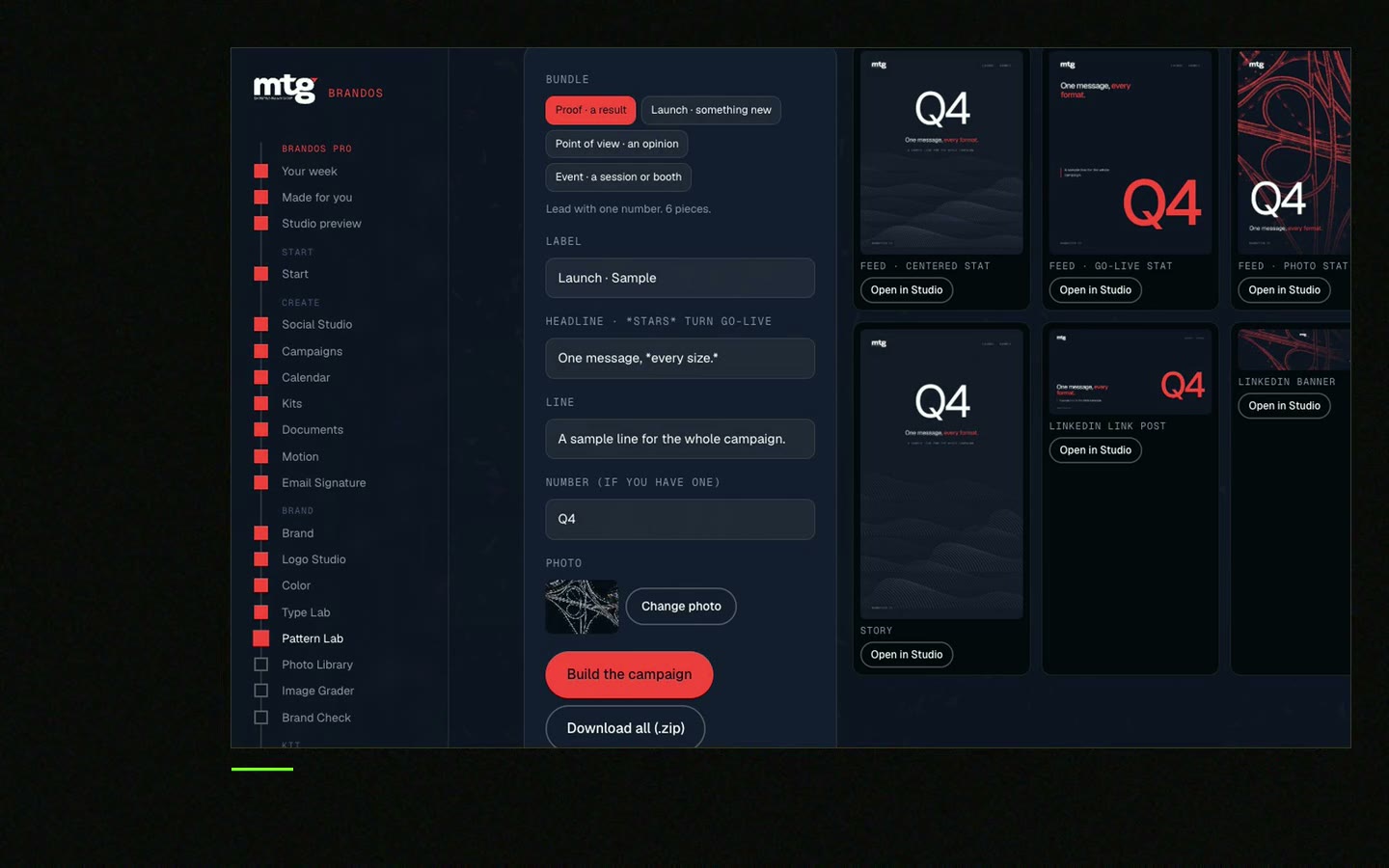
This is a real tool from a real Brand OS Portal, on the MTG brand. Change the words and the photo. Switch between feed, square and story.
Watch
I made short videos of the tools. Hear me explain them, then scroll through every one at work. Real tools, on a real brand.

Write a one-page brief, make one hero visual, pick three to five channels, and turn the hero into the other sizes. Check each one against your brand rules.
Three to five is enough for most small teams. More channels means more visuals to make and check.
Use one hero visual, one set of colours and fonts, and one headline. Start from locked templates. See how to keep campaign visuals consistent.
Usually a hero image, social posts in a few sizes, a banner, an email header and a landing page image. See the campaign asset checklist.
Yes, if the brand is locked into templates and tools. A designer is still right for the idea and the identity.
Death List Five. Five headaches, one portal. Sound on.
See what ChatGPT says about your company, and how to fix it.
You hear from me within 2 to 8 hours.
May I use cookies for Google Analytics and Clarity to see which pages help? Privacy



