
 Hrvatski
Social
Social post
Square and tall. A quote, a fact, a news post and a hiring post.
A good brand template lets anyone change the words and the photo. Everything else stays locked and on brand.
A brand template is a ready design in your colours, fonts and layout. People change the words and the photo. The rest stays the same.
To create brand templates, pick the 8 things your team makes most, design one strong layout for each, lock the logo, colours and fonts, leave the words and photo open, and share them from one link.
 By Vedran Obradović · Updated 5 November 2026
Do not start with 50. Start with the things your team makes every week.
Social
Square and tall. A quote, a fact, a news post and a hiring post.
Social
One for the company page, one for each person on the team.
Sales
Title, text, image, numbers and end slides. See the company PowerPoint template guide.
Sales
One A4 or Letter page about one product or service.
Daily
Same name, role, logo and link for every person.
Daily
Letterhead for proposals, reports and letters.
Events
Date, place and talk title, in one fixed layout.
Video
A moving post with your type and colours.
If you only make three, make the social post, the slide deck and the email signature. They are used the most.
This is the most important choice. Lock too little and the brand drifts. Lock too much and people stop using the template.
| Part of the template | Lock it? | Why |
|---|---|---|
| Logo and its place | Lock | The logo should never move, stretch or change colour. |
| Colours | Lock to brand colours only | People can pick, but only from your palette. |
| Fonts and sizes | Lock | Type is where templates break first. |
| Grid and margins | Lock | Keeps the space around things the same every time. |
| Headline words | Leave open, with a word limit | This is the job people came to do. |
| Photo | Leave open, from approved photos | Fresh photos keep posts alive. |
| Background | Two or three fixed options | Choice without chaos. |
Free tool
Templates copy whatever is there, good or bad. Answer a few short questions. You get your brand score and the first thing to fix. It is free.
This works in any tool your team already uses.
Step 1
Logo files, colour codes and fonts must be right. A template copies mistakes 100 times. Check which logo files you need.
Step 2
Ask the team what they made last month. Make templates for that, not for what might happen.
Step 3
One good layout beats five weak ones. Use real words, not lorem ipsum.
Step 4
Logo, colours, fonts and grid. Leave words and photo open.
Step 5
For example: headline up to 8 words. Long text breaks good layouts.
Step 6
One home, one owner. Delete old copies. See how to share brand files.
Leave your email. I design them by hand and send them to you within 48 hours. It costs you nothing.
I write to you from [email protected]. If you do not see it, check spam.
Fill one in for each template before anyone designs it. It stops long back and forth.
Template name: [e.g. LinkedIn quote post]
Who uses it: [e.g. sales team, 5 people]
How often: [e.g. twice a week]
Size: [check the platform help page for the current size]

LOCKED
- Logo: [which version, where, how big]
- Colours: [only these: name + hex]
- Fonts: [headline font + size, body font + size]
- Grid: [margins, where text sits]

OPEN
- Headline: [up to 8 words]
- Body text: [up to 25 words, or none]
- Photo: [from the approved photo folder only]
- Background: [option A / option B / option C]

Right example: [link]
Wrong example: [link, with why it is wrong]
Owner: [name] - ask them before changing the locked parts
The right and wrong examples matter most. People copy what they see. More on this in logo usage guidelines.
Honest overview. Pick the tool your team already opens every day.
| Tool | What it gives you | Locking | Good fit when |
|---|---|---|---|
| Canva | Brand Templates and a Brand Kit with logos, colours and fonts | Lock elements, or lock position only so text stays editable | Your team already designs in Canva |
| Adobe Express | Brand kits and shared templates | Lock elements, allow text or image replace, limit to brand colours and fonts | Your designers work in Adobe |
| Microsoft 365 | Company PowerPoint, Word and Excel templates in the Office apps through an organization assets library | Locks come from the template file itself | Your team lives in PowerPoint and Word |
| Brand OS Portal | Your brand files, rules and makers in one link, designed and set up by me | The brand parts are fixed, words and photo stay open | You want the team to make on-brand work without design tools |
Checked on 5 November 2026 on each company's own site.
In Canva and Adobe Express, locks and brand controls depend on the plan. Check your plan before you build. For the Canva side, read Canva Brand Kit vs brand guidelines.
Tick what is true today. Your ticks stay on this device.
0 of 8 done
Templates are one part of a bigger system. See how they sit next to files and rules in a brand portal, or what I build in Brand OS Portal.
Try one Brand OS Portal tool
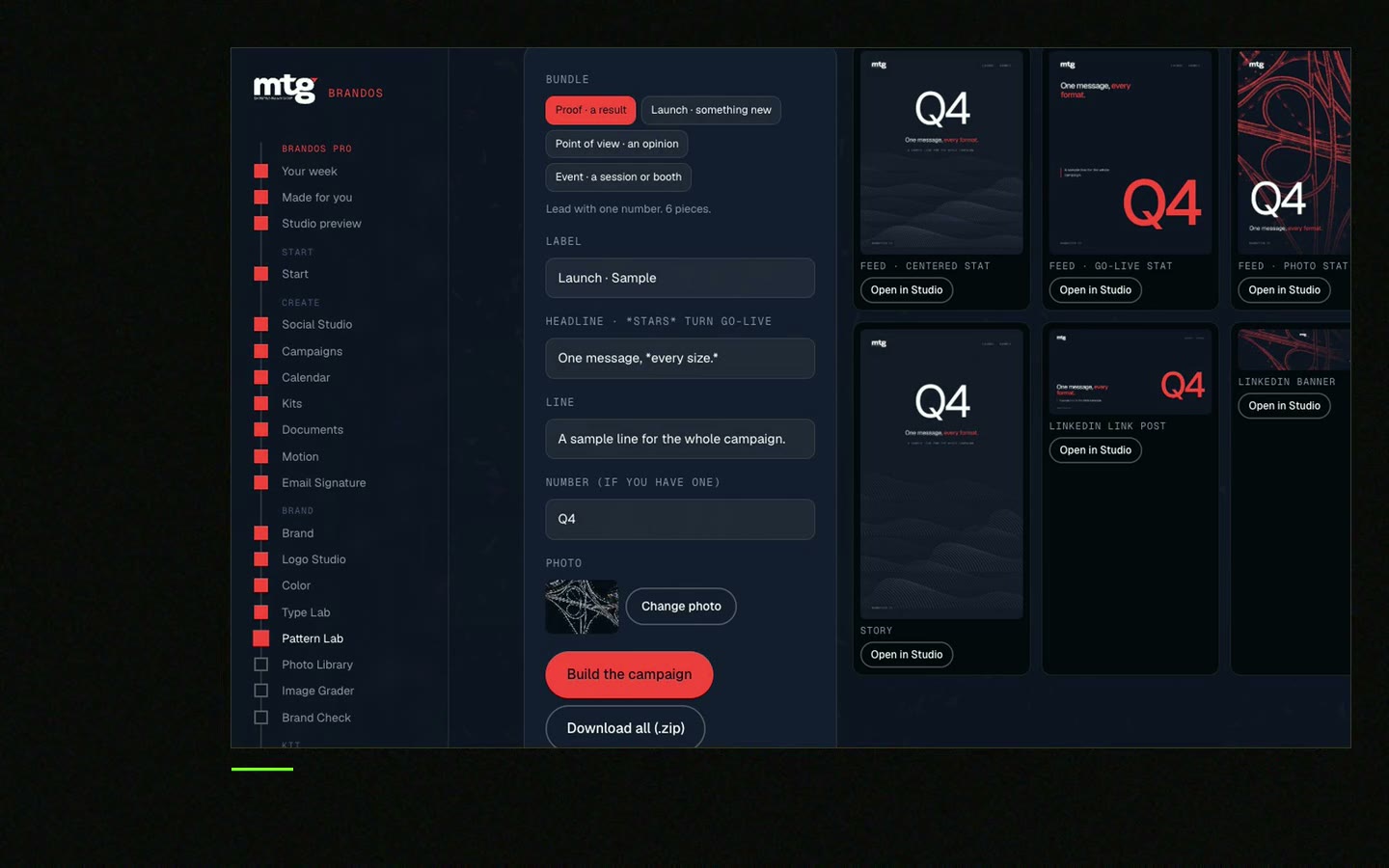
This is a real tool from a real Brand OS Portal, on the MTG brand. Change the words and the photo. The design stays on brand.
Ready designs in your colours, fonts and layout. People change the words and the photo, and the brand stays right.
Design the layout, then lock the logo and other fixed parts, and add it to your Brand Kit as a Brand Template. Locks and brand controls depend on your Canva plan.
Often about 8: social post, LinkedIn banner, slide deck, one-pager, email signature, document, event post and a short video.
The logo, colours, fonts, sizes and grid. Leave the words and the photo open, with a word limit.
Yes. Save them as Word or PowerPoint template files. Microsoft 365 can show them to the whole company through an organization assets library.
See what ChatGPT says about your company, and how to fix it.
You hear from me within 2 to 8 hours.
May I use cookies for Google Analytics and Clarity to see which pages help? Privacy





