
 Hrvatski
Type 1
Proof
A result, a customer quote, a case study, a number. Shows you deliver. See testimonial posts.
Plan four weeks of posts with three post types, a weekly rhythm and one template for each.
Free: your brand in 3 real designs, in 48 hours.
A B2B social media content calendar is a plan for what you post, when, and who makes it. Start with four weeks, three posts a week, and three post types: proof, teach and people.
Copy the plan below. Put one locked template behind each post type, so your team can make the posts without waiting for design.
 By Vedran Obradović · Updated 7 November 2026
A calendar breaks when every post is a new idea. Use types.
Type 1
A result, a customer quote, a case study, a number. Shows you deliver. See testimonial posts.
Type 2
One tip, one checklist, one carousel. Shows you know the topic. See carousel slides.
Type 3
The team, a launch, an event, a behind-the-scenes photo. Shows who is behind it. See event graphics.
Three posts a week is enough to be seen and not too much to keep up.
| Week | Monday | Wednesday | Friday |
|---|---|---|---|
| 1 | Teach: one tip | Proof: customer quote | People: team photo |
| 2 | Teach: checklist | Proof: a number | People: event or launch |
| 3 | Teach: carousel | Proof: short case story | People: founder note |
| 4 | Teach: answer a question | Proof: before and after | People: thank you post |
Swap days to fit your audience. The rhythm matters more than the day. Ideas for each type are in LinkedIn post templates for B2B.
Free tool
Answer a few short questions. You get your brand score and the top thing to fix. It is free and runs right here.
Paste it into a sheet or a doc. One row per post.
DATE | CHANNEL | TYPE (proof/teach/people) | IDEA IN ONE LINE | TEMPLATE | OWNER | CHECKED BY | STATUS
[Mon 10 Nov] | [LinkedIn company] | [Teach] | [One tip about X] | [Tip card] | [Name] | [Name] | [Idea / Draft / Ready / Posted]
[Wed 12 Nov] | [LinkedIn founder] | [Proof] | [Quote from customer] | [Quote card] | [Name] | [Name] | [Idea]
[Fri 14 Nov] | [LinkedIn company] | [People] | [Team at event] | [Photo card] | [Name] | [Name] | [Idea]

RULES
- Every post has an owner and a checker.
- Every number comes from the approved facts list.
- Nothing goes out without a template.
- Keep two ready posts in reserve for slow weeks.
The dates in brackets are examples. Use your own.
Leave your email. I design them by hand and send them to you within 48 hours. It costs you nothing.
I write to you from [email protected]. If you do not see it, check spam.
Planning is easy. Making the posts is where small teams stall.
If every post needs a designer, this plan dies in week two. That is the real reason most calendars fail, and it is the daily work a Brand OS Portal takes off your list.
When many people post, a plan keeps them in step.
Give each person one post type. Sales takes proof. The expert takes teach. The founder takes people. Everyone uses the same templates, so the feed looks like one company. See brand consistency for remote teams.
A designer is still the right person for strategy and a new identity. After that, the Portal handles the posts, banners and signatures.
Tick what is true. Your ticks stay on this device.
0 of 8 done
Try one Brand OS Portal tool
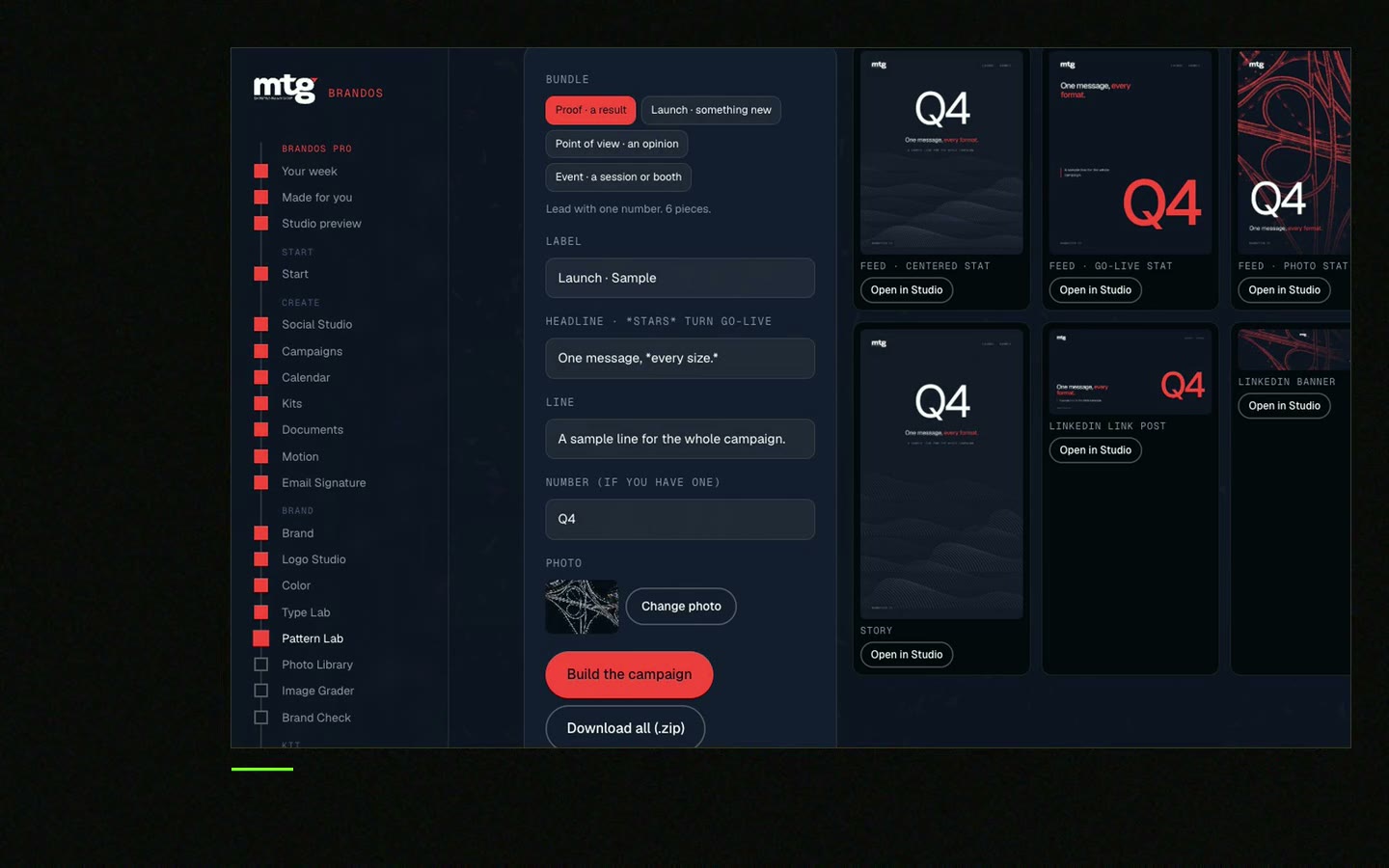
This is a real tool from a real Brand OS Portal, on the MTG brand. Pick a design, change the words and the photo, download.
Watch
I made short videos of the tools. Hear me explain them, then scroll through every one at work. Real tools, on a real brand.

Three posts a week is a steady rhythm for most small B2B teams. Pick a rhythm you can keep for a year.
Date, channel, post type, the idea in one line, the template, an owner, a checker and a status.
Four weeks is a good start. Write the words for all of them in one session.
Proof, teach and people. Proof shows results, teach shows knowledge, people shows who is behind the company.
Use a locked template for each post type. The team changes just the words and photos.
Death List Five. Five headaches, one portal. Sound on.
See what ChatGPT says about your company, and how to fix it.
You hear from me within 2 to 8 hours.
May I use cookies for Google Analytics and Clarity to see which pages help? Privacy





