
 Hrvatski
Problem 1
Mixed light
Some photos are warm and yellow, some are cold and blue.
Photos from different days and cameras look different. A simple grade makes them look like one brand.
Free: your brand in 3 real designs, in 48 hours.
To colour grade photos for brand consistency, pick one reference photo, fix light and white balance, set your colour feel, apply the same grade to every photo in a batch, then check each one side by side.
Write the grade down as a short recipe, so anyone can repeat it. Then check new photos against the brand before they go out.
 By Vedran Obradović · Updated 7 November 2026
People remember the feel of your photos more than any one picture.
Problem 1
Some photos are warm and yellow, some are cold and blue.
Problem 2
One photo is bright and punchy, the next is dull and flat.
Problem 3
Team phone photos, stock photos and agency photos sit side by side.
Rules for what to shoot belong in brand photography guidelines. This page is about the colour work on the files.
This works in any photo editor that can copy settings from one photo to many.
Step 1
One photo that looks like your brand on a good day. Put it next to your brand colours.
Step 2
Make whites look white and the exposure even. Do this before any style.
Step 3
Warm or cool. Rich or soft. Keep skin tones natural. Match the mood of your brand colours.
Step 4
Save your settings as a preset or recipe. Name it after the brand.
Step 5
Apply the same grade to every photo from one shoot, then fine tune just the ones that need it.
Step 6
Put 9 photos in a grid. Does it look like one set? Fix the odd ones.
Free tool
Answer a few short questions. You get your brand score and the top thing to fix. It is free and runs right here.
Fill it in once. Share it with everyone who takes or edits photos.
BRAND PHOTO GRADE - [company]
Reference photo: [link]
Light: [bright and airy / natural / moody]   White balance: whites look white
Colour feel: [warm / cool / neutral]   Colour strength: [rich / medium / soft]
Skin tones: natural, never orange or grey
Contrast: [low / medium / high]
Brand colour in photos: [e.g. one blue object in the frame, if natural]
Preset name: [name]   Saved at: [link]
Always: apply the preset, then check against the reference.
Never: heavy filters, mixed styles in one post, other brands' logos.
Checked by: [name]
Put the recipe next to your logo files and your templates, so it travels with the brand.
Leave your email. I design them by hand and send them to you within 48 hours. It costs you nothing.
I write to you from [email protected]. If you do not see it, check spam.
Where the photo comes from changes the work.
| Source | Common problem | What to do |
|---|---|---|
| Team phone photos | Uneven light, mixed colour | Fix white balance, apply the preset, crop in |
| Stock photos | Look like stock, wrong colour | Choose by colour feel, then apply the preset |
| Event photos | Dark rooms, mixed lamps | Fix exposure and white balance per photo |
| Agency photos | Already graded to their taste | Ask for ungraded files or the grade recipe |
Posts also need the right layout around the photo. See brand templates for teams.
A recipe helps. A check inside the tool helps more.
Most teams send each photo to a designer, or they post it as it is. Both cost something: one costs waiting, the other costs consistency.
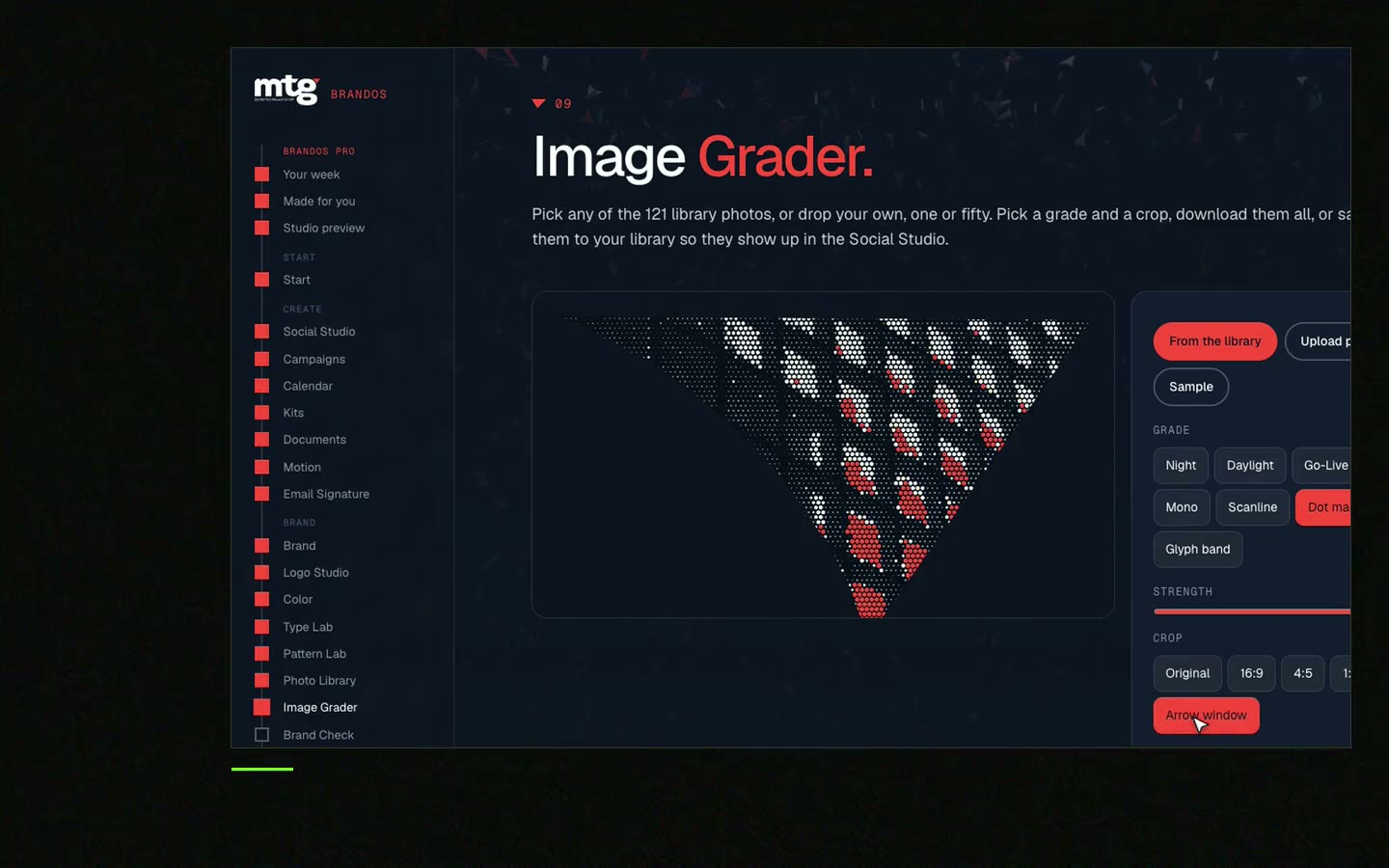
In a Brand OS Portal, Image Grader grades photos against the brand. Social Studio then keeps the layout, logo and fonts right. For MTG I made 121 graded photos and a Brand OS Pro Portal, and the team makes its own posts.
A designer or photographer is still right for a shoot and for a new identity. The portal is for the daily work after. See Brand OS Portal or brand compliance.
Tick what is true. Your ticks stay on this device.
0 of 7 done
Try one Brand OS Portal tool
This is a real tool from a real Brand OS Portal, on the MTG brand. Change the words and the photo. The design stays on brand.
Watch
I made short videos of the tools. Hear me explain them, then scroll through every one at work. Real tools, on a real brand.

Changing the colour and light of a photo to give it a chosen look.
Pick a reference, fix light and white balance, save a preset, apply it to the whole batch and compare side by side.
Yes. Choose by colour feel, then apply your preset so they sit next to your own photos.
A saved set of edit settings you can apply to many photos at once.
Write a grade recipe and put a check inside the tool your team uses.
Death List Five. Five headaches, one portal. Sound on.
See what ChatGPT says about your company, and how to fix it.
You hear from me within 2 to 8 hours.
May I use cookies for Google Analytics and Clarity to see which pages help? Privacy





