
 Hrvatski
Drift 1
Different words each time
One person writes "moody", another writes "dark and calm". The tool reads them as two looks.
One brand prompt block, a few reference images and a check. That is what keeps AI images looking like you.
Image AI stays on brand when every prompt starts from the same brand block: your colours in words, your light, your mood, your camera style and what you never show. Then you add the same reference images every time.
In Midjourney that means a fixed prompt block plus style references. In ChatGPT, Gemini and other tools it means the same block plus reference uploads. Below are the block, 12 prompts to copy and a check.
 By Vedran Obradović · Updated 4 November 2026
Each prompt starts from zero. The tool does not remember your brand unless you bring it.
Drift 1
One person writes "moody", another writes "dark and calm". The tool reads them as two looks.
Drift 2
Without references, the tool falls back to its own house style. Many brands then look the same.
Drift 3
Nobody compares the image with the brand rules before it goes out.
This is the same reason AI startups look the same. The fix starts with clear visual identity rules.
Write it once. Paste it at the end of every image prompt. Keep it in your brand rules.
[subject of this image], [action or scene].
Style: [photo / 3D render / flat illustration], [camera: e.g. 35mm, eye level, shallow depth].
Light: [e.g. soft daylight from the left / dark studio with one hard light].
Colours: [main colour in words, e.g. deep green], [second colour], mostly [neutral: off-white / near-black].
Mood: [3 words, e.g. calm, precise, human].
Background: [plain / real office / abstract texture].
Never: [things you never show: stock handshakes, glowing brains, robots, blue neon, text in the image].
Write colours as words, not only hex codes. Image tools follow "deep green with off-white" better than a code. Then check the colour in the final file.
Free tool
Image AI copies what you give it. Answer a few short questions and get your brand score and the first thing to fix.
Checked on 4 November 2026 in the Midjourney docs. Names can change, so check the docs when you start.
| Setting | What it does | Brand use |
|---|---|---|
| --sref | Style reference: copies the look of images you add, or a style code | Add 2-3 approved brand images to every prompt |
| --sw | Style weight: how strong the style reference is | Keep one value for the whole team |
| --oref | Omni Reference: keeps a person or object from an image | Keep a product or a mascot the same |
| Moodboards | A personal style built from images you choose | One moodboard per brand, shared with the team |
| --ar | Aspect ratio | Fix the sizes you use: 1:1, 4:5, 16:9 |
| --no | Leaves things out | Paste your "never" list here |
Checked on 4 November 2026 on docs.midjourney.com. Some settings only work with some model versions.
Keep the brand block, the reference images and these settings in one place with your brand rules. See what brand guidelines include and AI brand guidelines.
Leave your email. I design them by hand and send them to you within 48 hours. It costs you nothing.
I write to you from [email protected]. If you do not see it, check spam.
Each one ends with your brand block. In Midjourney, add your style references too.
1. Hero image for our homepage: [product] in use by [who], in [place]. [brand block]
2. LinkedIn post background, plenty of empty space on the left for a headline. [brand block]
3. Abstract texture that feels like [one brand word], for slide backgrounds. [brand block]
4. Team at work around a laptop, natural and unposed, faces not the focus. [brand block]
5. Close-up of hands using [product] on [device]. [brand block]
6. Event banner background for [event], wide, calm centre. [brand block]
7. Simple 3D object that stands for [idea, e.g. security as a closed shape], no text. [brand block]
8. Blog cover for an article about [topic], one clear subject, no text. [brand block]
9. Office or workspace that fits our brand, no people, morning light. [brand block]
10. Icon-style illustration of [idea], flat, two colours from our palette. [brand block]
11. Same scene as the reference image, but at night / in winter / in a different city. [brand block]
12. Five versions of this image with different crops for 1:1, 4:5 and 16:9. [brand block]
The brand block works in any image tool. Paste it as text, then upload your 2-3 reference images and say: "Match the light, colours and mood of these images."
Most tools can now edit an image you upload. That is often better than starting from zero: take an approved brand photo and ask for a new scene in the same look. Read Gemini image tools for brand assets for what works there.
For logos, keep AI to ideas and sketches. See ChatGPT prompts for logo design for why.
Tick what is true. Your ticks stay on this device.
0 of 8 done
At MTG the brand came with 121 graded photos, so the team always has real references to start from.
Try one Brand OS Portal tool
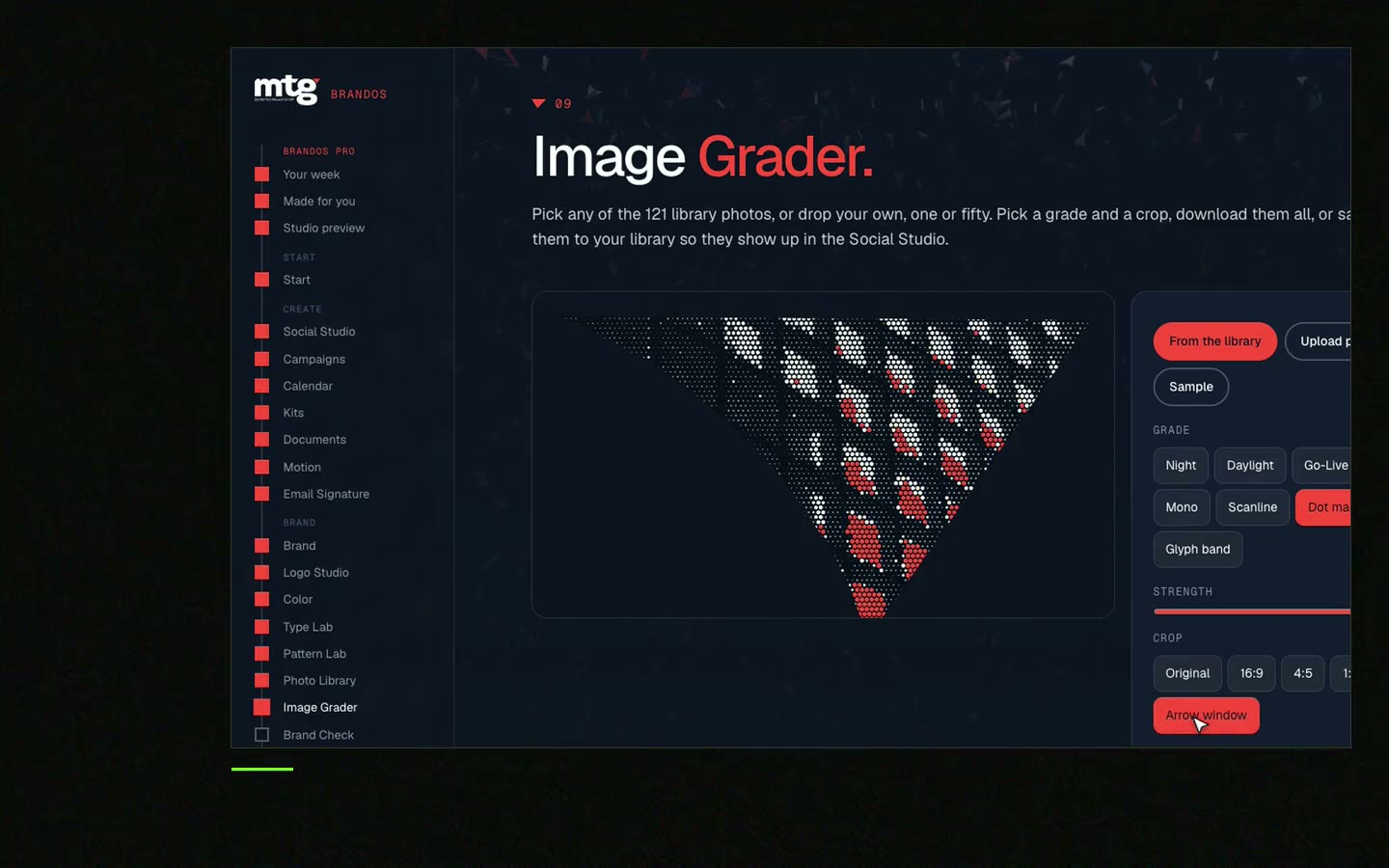
This is a real tool from a real Brand OS Portal, on the MTG brand. Patterns grow from the logo, so they look like one brand only.
Use the same brand prompt block every time, add the same 2-3 style reference images with --sref, and keep one style weight for the whole team.
It is the style reference setting. You add image links or a style code, and Midjourney copies the look of those images into the new one.
You can add them, but describe the colours in words too. Image tools follow words like "deep green and off-white" better. Always check the colour in the final image.
You can make logo ideas and sketches. The output is a picture, not a clean vector file, so a designer still needs to draw the final logo. See logo design.
Yes. Paste the same brand block and upload your reference images. The settings like --sref are Midjourney only.
One person, often in marketing or design. Keep it next to your brand rules so it is updated when the brand changes.
"He is a brand magician; he understood the challenge quickly and delivered a brand identity, complete with motion graphics, messaging, etc."
 Leah MarsdenCMO, MTG
"It was never really about creating one logo. It was about building something strong enough to grow with the company."
 Pierre-Marc NoëlFounder & CEO, Deepsea Networks
"The brand looks premium and actually fits an AI / tech company, and the guidelines are so clear our team just uses them without asking questions."
 Jeremy MurrayFounder, KORDIN and Stack8s

Get your brand score and the first thing to fix.
You hear from me within 2 to 8 hours.
May I use cookies for Google Analytics and Clarity to see which pages help? Privacy




