
 Hrvatski
Canva AI vs a brand portal: which keeps your designs on brand?
Canva is a big general design tool. A Brand OS Portal is made for one brand. See what each does.
Free: your brand in 3 real designs, in 48 hours.
Canva has a Brand Kit and brand templates, and its AI can use them. It is a broad tool that anyone can open and use for almost any design. A Brand OS Portal is built for one brand, with designs made by a designer for that brand.
If you make many different things, Canva is a fine home. If your team keeps going off brand even with templates, a portal with locked, ready designs and brand checks is the tighter fit. Many teams use both.
 By Vedran Obradović · Updated 7 November 2026
What Canva does for brands.
I checked Canva's own help pages on 7 November 2026. Here is the short version.
- Brand Kit holds your brand assets in one place for your team
- Brand Kit Builder can start a kit from your website or a PDF. You should review what it picks up
- Brand Templates added to a Brand Kit can be used by Canva AI, for example in Magic Design
- Locks on elements are advised, so the parts you want to keep stay as they are
- Brand voice guidelines you write can apply when people use Magic Write
That is a lot of help for a team that already lives in Canva. For the Brand Kit idea itself, see Canva Brand Kit vs brand guidelines.
What a Brand OS Portal does.
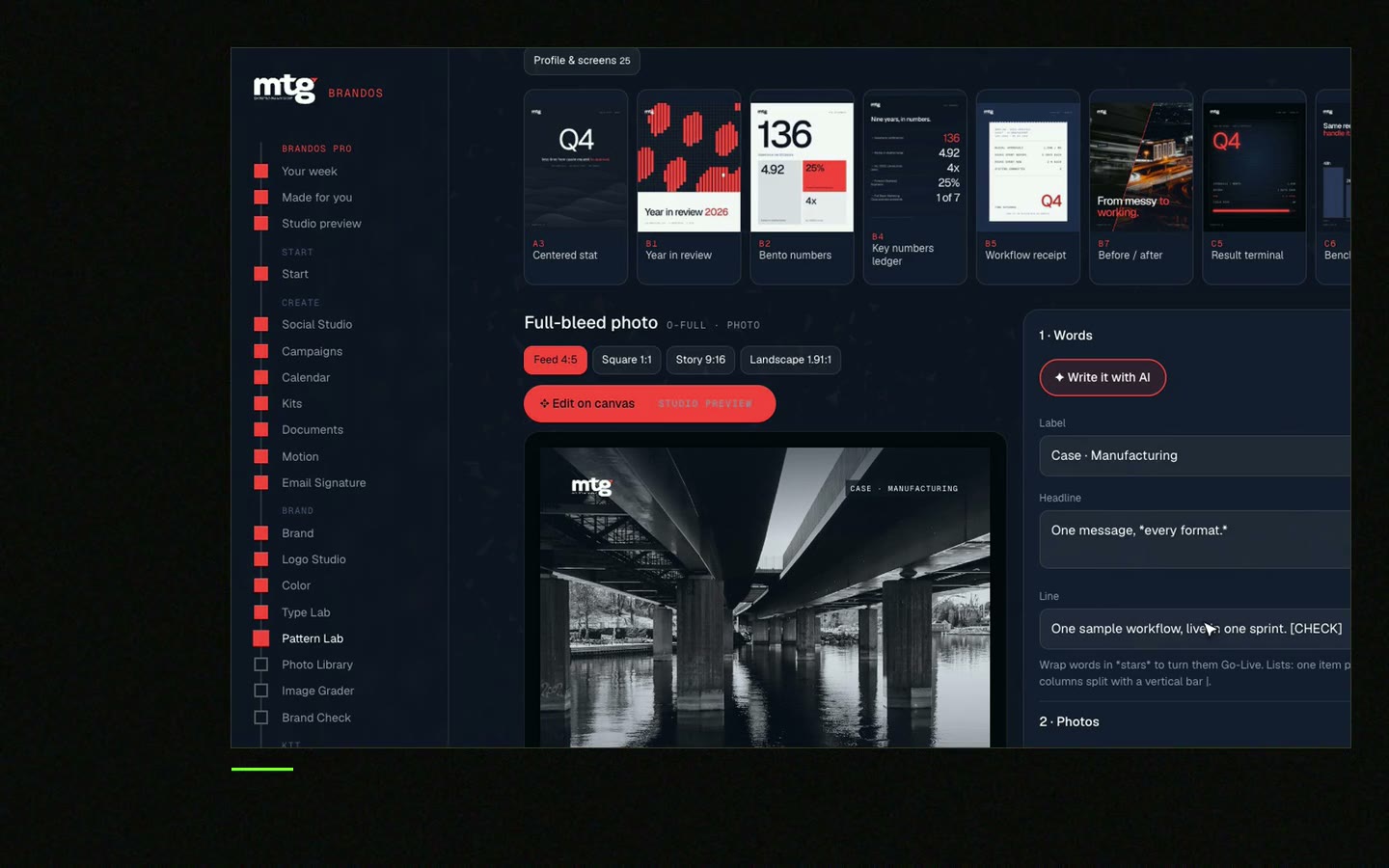
It is not a general tool. It is a portal made for your brand, with the designs already made.
- Ready designs that I made for your brand. Your team changes the words and photo, and the design still looks right
- Every size for feed, square and story
- Logo Studio hands out the right logo for each background
- Voice Check checks words against your brand voice, and Image Grader grades photos against the brand
- AI Kit gives ChatGPT and Claude the same brand rules
More on the idea in what is a Brand OS.
Free tool
Can AI read your brand today?
Type your website address. You see what AI tools can read on your site and what to fix. It is free and runs right here.
Canva and a brand portal, side by side.
Same job, two ways to do it.
| Canva | Brand OS Portal | |
|---|---|---|
| Built for | Many people and many kinds of design | One brand |
| Brand assets in one place | Yes, in a Brand Kit | Yes, with the logo handed out by Logo Studio |
| Starting point | Brand Kit Builder can read a website or PDF | A designer sets it up from your brand |
| Templates | Brand Templates your team makes or adds | Designs made for your brand by a designer |
| AI and templates | Canva AI can use Brand Templates | AI to template, with approved content |
| Brand voice | Written guidelines used by Magic Write | Voice Check on the words |
| Good fit | Wide range of everyday design | Posts, decks, banners and signatures in one brand |
Checked on 7 November 2026 on each company's own site.
Get 3 templates in your brand. Free.
Leave your email. I design them by hand and send them to you within 48 hours. It costs you nothing.
Got it. I start on yours today. Your 3 free templates reach you within 48 hours.
I write to you from [email protected]. If you do not see it, check spam.
Why teams go off brand even with templates.
A template is a starting point, nothing more. People still change things.
A founder told me the same story that many marketing leads tell: "we have a Brand Kit, but every deck looks different". Someone swaps a font. Someone adds a new colour. A month later the templates are a mess.
There are three causes. The template can be changed. Nobody checks the words. And the person making it has no designer to ask.
A portal limits the change to the words and the photo. The rest stays locked by design. That is the whole trick.


Which one fits you? Tick what is true.
Your ticks stay on this device.
0 of 8 done
Ticks on the top two lines point to Canva. Ticks on the rest point to a portal. Read brand templates for teams and Claude Design vs Figma vs Canva.
A designer, Canva and a portal can all be right.
They do different jobs.
A designer is still right for strategy and a new identity. Canva is a good tool for many quick jobs. A Brand OS Portal is for the daily work after the identity exists, so you stop paying for every post, deck, banner and signature. See Brand OS Portal or brand guidelines vs Brand OS.
Try one Brand OS Portal tool
See an on-brand post in seconds.
This is a real tool from a real Brand OS Portal, on the MTG brand. Change the words and the photo. The design stays on brand.
Watch
Watch me show every tool.
I made short videos of the tools. Hear me explain them, then scroll through every one at work. Real tools, on a real brand.
Hear me explain
Every tool at work





Straight answers.
Can Canva AI make on-brand designs?
Canva's help pages say Brand Templates in a Brand Kit can be used by Canva AI. Locking the parts you want to keep helps the result. Check what your plan includes.
Is a brand portal better than Canva?
It depends on the job. Canva covers many kinds of design. A portal covers one brand tightly, with designs made for it.
Can I use Canva and a Brand OS Portal together?
Yes. Keep Canva for wide, one-off design. Use the portal for the posts, decks and banners that must always match.
Why do my team's Canva designs still look off brand?
Templates can be edited, nobody checks the words, and there is no designer to ask. Lock what must not change.
What is a Brand OS Portal?
A portal made for your brand where your team makes on-brand work. See Brand OS Portal.
One more thing.
Death List Five. Five headaches, one portal. Sound on.
Does AI get your brand right? Check it free.
See what ChatGPT says about your company, and how to fix it.
Rather write to me?
Got it.
You hear from me within 2 to 8 hours.